Showing posts with label Tips. Show all posts

WARNING : DON'T OFFER DUIT KOPI FROM NOW ON!

DEAR FRIENDS

If you have ever paid or are thinking of paying ' Coffee Money' when stopped for traffic or other offences, DON'T EVER Do This Again.

The traffic department (JPJ) has recently started a campaign to be rid of corruption. Every Officer on duty will be rewarded with RM100.00 if they report each case of bribery to the department.

This is how they do (trick you into) it. They will note down the details of your IC/MyKad, and ask you how you want to settle ( 'Macam mana nak selesai?')

If you indicate yes or even offer to give them any money, they will report the incident by rejecting your 'Kopi Money' and get the RM100.00 instead as an incentive for their integrity and 'Honest' pubicity.

This means that You will end up having a summon issued to you and perhaps a charge for bribery.

SO DON'T PAY DUIT KOPI AGAIN, especially if you hope to go free with a lesser amount of money compared to the fine. Even if you want to pay over RM200, the JPJ Officers would rather have a 'good' name than to take your kopi money. Just beware of their trick because the cops are now accumulating 'cookies' points for their promotion and pay increment - with your help if possible. They should have done this to stop corruption long time ago... but anyway it's better late than never, right?

SPREAD THIS MESSAGE TO EDUCATE OTHERS ON THIS NEW ANTI-RASUAH POLICY! AND DON'T YOU DARE TO CORRUPT ANY JPJ OR EVEN POLICE OFFICERS AGAIN!

WHAT TO DO IF STOPPED BY MALAYSIAN POLICE

This is is very useful information. Please pass it on to your friends and family.............especially the women folk!

The next time you are stopped by persons who claimed they are plain clothes police, you are under no obligation to answer their questions or follow their orders, lawyers told Malaysiakini today.


"Policeman who is not wearing his uniform does not have the authority to stop anyone," lawyer and human rights activist Sivarasa Rasiah said.

Sivarasa was commenting on the alleged gang-rape of an 18-year-old Uni student by four men claiming to be police officers on New Year's Eve. The girl said that her car was stopped in Taman Tun Dr Ismail in Kuala Lumpur and were asked by the men to open the car bonnet. She was then told that she had committed an offence and ordered to follow the men to a police station. The girl was driven in her car along the North-South expressway to the Tapah-Cameron Highlands road before she was raped in an oil palm estate.

This incident, and many others, have sparked confusion over the procedures which motorists must follow when flagged down by the police. The most common problem is that most people take instructions without determining if the other person is really a cop," lawyer Annie Santiago said.

However, if you are stopped by a uniformed policeman, then you are required to stop. But you need not get out of the car because you are not expected to do so, Santiago said. He other rule to follow is to provide your identity card only when you are asked to do so. "Even then, you should get his ID first to confirm if he is a cop. There is no harm in calling the relevant police station to verify if he is supposed to be on duty that day," Sivarasa said.

Both lawyers said that motorists should never follow an officer to the police station unless one is under arrest . "If you are not sure, and your instincts tell you that something is wrong, then drive off to the nearest police station and lodge a report," Sivarasa said.

In response to the alleged gang-rape of the 18-year-old, Women's Aid Organisation executive-secretary Ivy Josiah called on the police to launch an education program to teach the public about their rights to prevent them from being victimised by bogus police officers.


Procedures to follow in the event you are stopped by uniformed police Officers while driving:


1. Stop the car and wind down your window.
2. If the police officers ask for your documents, request to see their
IDs first.

3. If you are satisfied about their identity, ask them if you are being
summoned, and for what offence.
4. Produce your identity card and driver's license and wait to collect

your summon ticket.

In the event that the police officers ask you to follow them to the police station:


1. Ask if you are under arrest and for what offence.
2. If you are not under arrest, you have the right to leave.

In the event you are flagged down by persons you believe could be plain clothes police:


1. Do not stop because plain clothes police officers do not have the
authority to stop you.

2. Drive to the nearest police station and lodge a report. (The same
procedure applies to pedestrians)


In the event the police come to your house:


1. Do not let them in before checking their IDs.
2. If you are not satisfied, phone the nearest police station and
confirm if they had been sent to your house.

3. You are under no obligation to allow them into the house if they
don't have a search warrant.

4. Do not go with them if you are not under arrest.

In the event persons who claimed to be plain clothes police come to your house:


1. Do not let him in because they do not have the authority to do so.
2. Lodge a report at the nearest police station.


PLEASE PASS IT ON..........


PLEASE PASS IT ON..........


PLEASE PASS IT ON............

Canon DPP 安裝分享

望可以幫到大家

起canon download 既DPP 等software, 只係可以update, 如果部機本身冇裝canon 既software 加唔見左隻cd就裝唔到
舊既version 可以用zip software extract 佢, 但新download 個d就唔得.
研究左一下, 發現只要加入一個registry 就可以順利install 架啦
我測試係windows xp 32-bit 同windows vista ultimate 64-bit

先新加一個text document, 打開佢, 加入以下既data, 之後將個file name 改做canon.reg, 再double click 佢就ok 架啦.
windows xp 32-bit
-------
Windows Registry Editor Version 5.00

[HKEY_LOCAL_MACHINE\SOFTWARE\Canon]
[HKEY_LOCAL_MACHINE\SOFTWARE\Canon\DPP]
[HKEY_LOCAL_MACHINE\SOFTWARE\Canon\EOSViewerUtility]
[HKEY_LOCAL_MACHINE\SOFTWARE\Canon\PhotoStitch]
[HKEY_LOCAL_MACHINE\SOFTWARE\Canon\ZoomBrowser]
-------

windows vista 64-bit
-------
Windows Registry Editor Version 5.00

[HKEY_LOCAL_MACHINE\SOFTWARE\Wow6432Node\Canon\DPP]
[HKEY_LOCAL_MACHINE\SOFTWARE\Wow6432Node\Canon\EOSViewerUtility]
[HKEY_LOCAL_MACHINE\SOFTWARE\Wow6432Node\Canon\PhotoStitch]
[HKEY_LOCAL_MACHINE\SOFTWARE\Wow6432Node\Canon\ZoomBrowser]

original from here
http://www.dchome.net/viewthread.php?tid=575488&extra=page%3D1

REMEMBER HIS FACE!!!


Last Saturday, a friend and i went to Red Box. On the way going to Plaza Gurney i was stuck in a traffic jam at Jelutong. As normal, i put my hand bag at the back seat while my friend sitting beside me. It was verry jam and because of too long of waiting there i started to look around. Suddenly i noticed a guy standing at the road side and looking at my hand bag that i had put at the back seat. I immediately lock the door. That guy really come to my car and he tried to open my car's back door. I immediately snap his picture.Women out there, pls lock your car door once u get into your car.And pls remember this bastard face. Beware of him.

What TRUE words!!

F A M I L Y

I ran into a stranger as he passed by,
'Oh excuse me please' was my reply.


He said, 'Please excuse me too;
I wasn't watching for you.'


We were very polite, this stranger and I.
We went on our way and we said goodbye.


But at home a different st! ory is told,
How we treat our loved ones, young and old.


Later that day, cooking the evening meal,
My son stood beside me very still..


When I turned, I nearly knocked him down.!
'Move out of the way,' I said with a frown.


He walked away, his little heart broken..
I didn't realize how harshly I'd spoken.


While I lay awake in bed,
God's still small voice came to me and said,


'While dealing with a stranger,
common courtesy you use,
but the family you love, you seem to abuse.


Go and look on the kitchen floor,
You'll find some flowers there by the door.


Those are the flowers he brought for you.
He picked them himself: pink, yellow and blue.


He stood very quietly not to spoil the surprise,
you never saw the tears that filled his little eyes.'


By this time, I felt very small,
And now my tears began to fall.


I quietly went and knelt by his bed;
'Wake up, little one, wake up,' I said.


'Are these the flowers you picked for me?'
He smiled, 'I found 'em, out by the tree.


I picked 'em because they're pretty like you.
I knew you'd like 'em, especially the blue.'


I said, 'Son, I'm very sorry for the way I acted today;
I shouldn't have yelled at you that way.'
He said, 'Oh, Mom, that's okay.
I love you anyway.'


I said, 'Son, I love you too,
and I do like the flowers, especially the blue.'


FAMILY
Are you aware that if we died tomorrow, the company
that we are working for could easily replace us in
a matter of days.
But the family we left behind will feel the loss
for the rest of their lives.


And come to think of it, we pour ourselves more
into work than into our own family,
an unwise investment indeed,
don't you thin! k?
So what is behind the story?


Do you know what the word FAMILY means?
FAMILY = (F)ATHER (A)ND (M)OTHER (I) (L)OVE (Y)OU

May God bless you and your family

Ways To Speed Up WinXP

1. Defragmenting remains an important task. Why? For one, power consumption and heat can be directly related to a fragmented hard drive. When the computer's operating system requests data, if a file is not contiguous, then extra seeking on the disk may be required. But a more important consideration is disk failure. Should a hard drive fail, the likelihood of successfully recovering data from the dead or damaged drive improves significantly if the data is contiguous rather than randomly scattered about the drive platters.

2. If a PC has less than 512 MB of RAM, add more memory. This is a relatively inexpensive and easy upgrade that can dramatically improve system performance.

3. Ensure that Windows XP is utilizing the NTFS file system. If you're not sure, here's how to check: First, double-click the My Computer icon, right-click on the C: Drive, then select Properties. Next, examine the File System type; if it says FAT32, then back-up any important data. Next, click Start, click Run, type CMD, and then click OK. At the prompt, type CONVERT C: /FS:NTFS and press the Enter key. This process may take a while; it's important that the computer be uninterrupted and virus-free. The file system used by the bootable drive will be either FAT32 or NTFS. I highly recommend NTFS for its superior security, reliability, and efficiency with larger disk drives.

4. Disable file indexing. The indexing service extracts information from documents and other files on the hard drive and creates a "searchable keyword index." As you can imagine, this process can be quite taxing on any system.

The idea is that the user can search for a word, phrase, or property inside a document, should they have hundreds or thousands of documents and not know the file name of the document they want. Windows XP's built-in search functionality can still perform these kinds of searches without the Indexing service. It just takes longer. The OS has to open each file at the time of the request to help find what the user is looking for.

Most people never need this feature of search. Those who do are typically in a large corporate environment where thousands of documents are located on at least one server. I recommend disabling it.

Here's how: First, double-click the My Computer icon. Next, right-click on the C: Drive, then select Properties. Uncheck "Allow Indexing Service to index this disk for fast file searching." Next, apply changes to "C: subfolders and files," and click OK. If a warning or error message appears (such as "Access is denied"), click the Ignore All button.

5. Update the PC's video and motherboard chipset drivers.

6. Once a month, run a disk cleanup. Here's how: Double-click the My Computer icon. Then right-click on the C: drive and select Properties. Click the Disk Cleanup button -- it's just to the right of the Capacity pie graph -- and delete all temporary files.

7. In your Device Manager, double-click on the IDE ATA/ATAPI Controllers device, and ensure that DMA is enabled for each drive you have connected to the Primary and Secondary controller. Do this by double-clicking on Primary IDE Channel. Then click the Advanced Settings tab. Ensure the Transfer Mode is set to "DMA if available" for both Device 0 and Device 1. Then repeat this process with the Secondary IDE Channel.

8. Upgrade the cabling. As hard-drive technology improves, the cabling requirements to achieve these performance boosts have become more stringent. Be sure to use 80-wire Ultra-133 cables on all of your IDE devices with the connectors properly assigned to the matching Master/Slave/Motherboard sockets. A single device must be at the end of the cable; connecting a single drive to the middle connector on a ribbon cable will cause signaling problems. With Ultra DMA hard drives, these signaling problems will prevent the drive from performing at its maximum potential. Also, because these cables inherently support "cable select," the location of each drive on the cable is important. For these reasons, the cable is designed so drive positioning is explicitly clear.

9. Remove all spyware from the computer. Use free programs such as AdAware by Lavasoft or SpyBot Search & Destroy. Once these programs are installed, be sure to check for and download any updates before starting your search. Anything either program finds can be safely removed. Any free software that requires spyware to run will no longer function once the spyware portion has been removed.

10. Remove any unnecessary programs and/or items from Windows Startup routine. Using the MSCONFIG utility is one way. Here's how: First, click Start, click Run, type MSCONFIG, and click OK. Click the StartUp tab, and then uncheck any items you don't want to start when Windows starts. Unsure what some items are? Visit the WinTasks Process Library. It contains known system processes, applications, as well as spyware references and explanations. Or quickly identify them by searching for the filenames using Google or another Web search engine. Or even better yet. If you have Spybot S&D installed. You can use it to stop programs from starting up.
Open Spybot and go into Advanced Mode. Go down to Tools, and then open System Startup. There you can disable programs from starting.
NOTE: If you have the Genuine Windows Advantage installed, you will want to leave all "system.ini" running. Or you wont be able to get updates from MS to install.

11. Remove any unnecessary or unused programs from the Add/Remove Programs section of the Control Panel.

12. Turn off any and all unnecessary animations, and disable active desktop. In fact, for optimal performance, turn off all animations. Windows XP offers many different settings in this area. Here's how to do it: First click on the System icon in the Control Panel. Next, click on the Advanced tab. Select the Settings button located under Performance. Feel free to play around with the options offered here, as nothing you can change will alter the reliability of the computer.

13. If you are an advanced user who is comfortable editing their registry, try some of the performance registry tweaks offered at Tweak XP.

14. Visit Microsoft's Windows update site regularly, and download all updates labeled Critical. Download any optional updates at your discretion.

15. Update your anti-virus software on a weekly, even daily, basis. Make sure you have only one anti-virus software package installed. Mixing anti-virus software is a sure way to spell disaster for performance and reliability.

16. Make sure you have fewer than 500 type fonts installed on your computer. The more fonts you have, the slower the system will become. While Windows XP handles fonts much more efficiently than did the previous versions of Windows, too many fonts -- that is, anything over 500 -- will noticeably tax the system.

17. Do not partition the hard drive. Windows XP's NTFS file system runs more efficiently on one large partition. The data is no safer on a separate partition, and a reformat is never necessary to reinstall an operating system. The same excuses people offer for using partitions apply to using a folder instead. For example, instead of putting all your data on the D: drive, put it in a folder called "D drive." You'll achieve the same organizational benefits that a separate partition offers, but without the degradation in system performance. Also, your free space won't be limited by the size of the partition; instead, it will be limited by the size of the entire hard drive. This means you won't need to resize any partitions, ever. That task can be time-consuming and also can result in lost data.

18. Check your system's RAM to ensure it is operating properly. I recommend using a free program called MemTest86. The download will make a bootable CD or diskette (your choice), which will run 10 extensive tests on the PC's memory automatically after you boot to the disk you created. Allow all tests to run until at least three passes of the 10 tests are completed. If the program encounters any errors, turn off and unplug the computer, remove a stick of memory (assuming you have more than one), and run the test again. Remember, bad memory cannot be repaired, but only replaced.

19. If the PC has a CD or DVD recorder, check the drive manufacturer's Web site for updated firmware. In some cases you'll be able to upgrade the recorder to a faster speed. Best of all, it's free.

20. Disable unnecessary services. Windows XP loads a lot of services that you most likely do not need.

21. At least once a year, open the computer's cases and blow out all the dust and debris. While you're in there, check that all the fans are turning properly. Also inspect the motherboard capacitors for bulging or leaks.

How do I backup my files and folders in XP?

Windows XP comes with a backup tool called NTBACKUP (NTBACKUP.MSI from Windows XP CD-ROM). In Windows XP Home Edition, this tool has to be installed manually from the CD-ROM, whereas in Windows XP Professional, this tool is installed by default.

Double-click the Ntbackup.msi file in the following location on the Windows XP Home Edition CD to start a wizard that installs NTBackup: X:\VALUEADD\MSFT\NTBACKUP

X:\ refers to the CD-ROM drive-letter

Note: Usually, OEMs such as Compaq, DELL won't ship the Windows XP CD nor they include the NTBACKUP utility by default. You can download a copy of NTBACKUP.MSI here.

Backing up your files using NTBackup Utility:

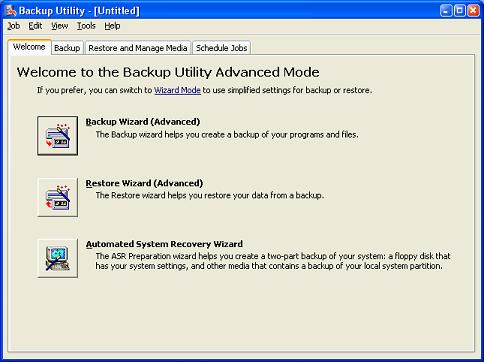
Click Start, Run and type NTBACKUP

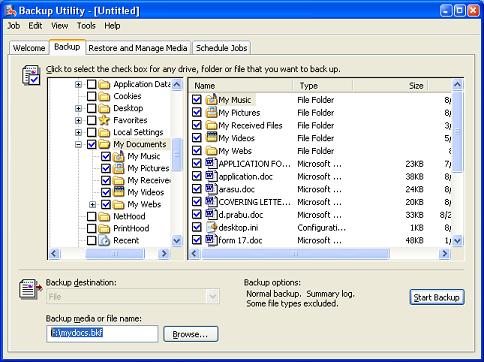
Select Backup tab at the top

In the left pane, scroll to the file/folder which you want to backup and put a checkmark on it.

At the bottom, mention the output filename (the backup output)

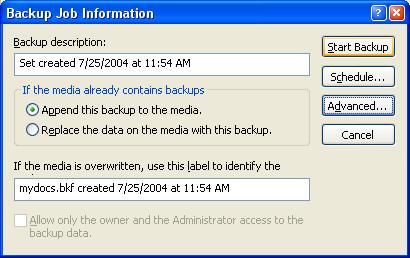
Once set, click Start Backup button in the right, and again click Start Backup in resulting dialog

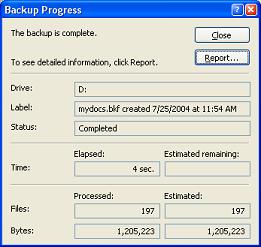
ntbk1.JPG (31692 bytes) >ntbk2.JPG (45596 bytes)

ntbk3.JPG (26699 bytes) > ntbk4.JPG (16657 bytes)

NTBACKUP does not have the ability to write to CDs directly. You will need to save the backup to hard drive, then transfer or burn it to a CD-ROM. Also, while backing up several files, make sure you backup the files in separate sets of each max 650MB (so that it fits on a CD-ROM)

See also

FREE Windows Backup Software add-on for NTBackup

Enhanced Windows Backup uses Windows' built in backup engine called Windows Backup (ntbackup.exe) which provides state-of-the-art core backup technology. Enhanced Windows Backup substantially extends the capabilities of NTBackup, providing an effective integrated backup solution.

FDA limits salmonella warning to Mexican peppers

WASHINGTON (CNN) -- Only Mexican-grown raw jalapeños and raw serrano peppers have been linked to the salmonella outbreak, a spokesman for the Food and Drug Administration said Friday.

Mexican officials said the findings were "premature," even as the FDA issued an advisory stating that a contaminated jalapeño pepper originated in Mexico. The news came just days after the FDA announced it discovered salmonella on a jalapeño imported from Mexico at The Agricola Zarigosa produce-distribution center in McAllen, Texas. But Mexican Embassy spokesman Ricardo Alday noted that the investigation is ongoing. "Mexico strongly urges the FDA to abstain from making any further public comment implicating Mexican produce in this outbreak until it has completed its investigation of jalapeño peppers in Mexico, and until the United States has assured the result with their Mexican counterparts," Alday said. Peppers grown in the United States have not been connected to the outbreak that has sickened more than 1,000 people since April, said FDA spokesman Michael Herndon.

Initially, tomatoes seemed the most likely source of the outbreak. The FDA told consumers to avoid certain raw tomatoes on June 7, prompting grocery chains and some restaurants nationwide to stop offering them.

The agency lifted that ban last week, determining that tomatoes currently in fields and stores are safe. Learn about the differences between salmonella and E. coli » The FDA now advises consumers to avoid raw jalapeño peppers grown in Mexico and any foods containing raw jalapeño peppers grown in Mexico. Only immune-compromised people, the elderly and infants should avoid raw serrano peppers from Mexico, Herndon said.

Cooked or pickled peppers from cans or jars are not part of the warning. Learn how to keep your food safe » Tomatoes, which were the original focus of the investigation, still have not been ruled out as a possible source of the outbreak, said Dr. David Acheson, director of food safety for the agency. "The science that indicated that tomatoes were implicated was strong and is still strong," he said "It's not that tomatoes have been exonerated." He said officials do not believe that tomatoes currently on the market are contaminated. Officials said earlier this week that tomatoes could have been paired with another food that was contaminated, prompting the outbreak.

Fake RM50 notes

Here's some clues upon checking a fake RM50 note(s), well no disclaimer is set upon this email though, and the public has the right to know, the cross means fake, the tick sign means genuine.:

Unlimited Free Image and File Hosting at MediaFire

Well, I hope these are the right method to differentiate. Public safety first.

左腦思考還是右腦思考

試試看---你看到的美女是順時針還是逆時針轉動?---(說明在後)

每個人看來都是不一樣的
順時針轉的話屬於是用右腦較多的類型
逆時針轉屬於使用左腦較多的類型
大部分人的眼裡裡是逆時針方向轉動
但也有人看來是順時針方向轉動的
順時針的情況女性比男性多~

逆時針轉動的 , 突然變成順時針的話 , IQ是 160以上 !!!
試試吧 !~~~

有圖有真相(給一些直接說我騙人的莽夫)
 
左圖:舉左手、頭往左偏
右圖:舉右手、頭往右偏
我做的事情只有用白線明顯告訴你那是左腳還是右腳


科學人雜誌--天才的特殊思維
作者﹕巫石吉

頂葉負責掌管腦中的數學和邏輯,這也是愛因斯坦成為天才的秘密。但不可否認的,愛因斯坦豐富的想像力與創造力,是使他的右腦不斷激發出潛在能力的重要因素之一。

左腦因為是以語言處理訊息,控制知識、判斷力、思考力因此被稱為「知性腦」﹔右腦則控制著自律神經與字宙波動共振,由於是圖像腦,因此造型能力優越,被稱為「藝術腦」。

有 關右腦的神奇功能研究,是始於1981年加州理工學院羅傑‧史貝利博士研究右腦獲得諾貝爾獎以後,人們才開始對右腦有所認識,在此之前,人們並不認為左腦 與右腦的功能有那麼大的差別。史貝利在分割腦的實驗中發現,左腦與右腦這兩個半球完全以不同的方式在進行思考,他發現左腦用語言進行思考,右腦則是以圖像 進行思考﹔左腦偏向語言、邏輯性的思考,右腦則是影像和心像的思考。

根據七田真博士的研究,原來人在誕生之初,右腦的能力還很發達,右 腦具備了超越常識那種幾乎可稱為全然未知的天才似的能力,這種能力自古以來就隱藏在人們腦海裡,是一種超越時間、空間,與無限境界相連結的能力,但是因為 人類世界是以教導、開啟左腦為主,讓小孩子努力學習語言以及往後生存所必需的知識,久而久之,左腦越來越發達,右腦卻因為少用而日形退化。

至 於什麼樣的成人比較容易打開右腦,七田真博士認為,心思專注、純真沒有成見的人,比較容易進入神奇的右腦世界。你相信超能力嗎?如果你有看過(雨人)這部 電影,一定對片中達斯汀霍夫曼飾演的哥哥印象深刻,他不但能正確快速數出散落一地的火柴數目,而且飾演他弟弟的湯姆克魯斯還利用他天賦異稟的「透視」能 力,上賭場找人玩撲克牌,結果對手的牌在達斯汀霍夫曼的「全神貫注」下,被透視得一覽無疑,湯姆克魯斯因此贏了一大筆錢。

或許你會認為那是電影誇張其事,現實世界中,人不可能具備那樣的能力。如果你這麼想,你就是犯了習慣左腦思考的錯誤,其實,人類大腦的另一半-右腦,擁有的能力是左腦思考者很難想像的。

How To Bypass WPA (Windows Activation) On Windows XP

How to bypass WPA (Windows Activation) on Windows XP
Tested on Windows XP Professional SP2 and Windows Server 2003 R2.

First, click "Run..." on your start menu, type "regedit" and press enter.
The Registry Editor opens up, and you are presented with a long list of keys on the left.
Browse through the list to HKEY_LOCAL_MACHINE\SOFTWARE\Microsoft\Windows NT\CurrentVersion\WPAEvents.
(If you can't find this key, you're screwed!)
On the right, you should see a stringz value named OOBETimer.
This is the activation stuff. If you change it, Windows will change it back within a few seconds.
Whatever its value is, change it to FF D5 71 D6 8B 6A 8D 6F D5 33 93 FD.
(At first I thought this was different for each machine/serial number, but it's always the same if windows is activated...LOL)
After you've changed it, right-click WPAEvents and choose "Permissions..."
A little window opens up with a list of user names. Click SYSTEM, and in the list below ("Permissions for SYSTEM") check every box under "Deny". Click OK to own windows. You don't even have to reboot lol.
If you're too slow windows might change it back, so just hit F5 to refresh and make sure it got saved.
If not, just try again. Microsoft owns for making it so easy to hack their software.
So, just keep on enjoying an activated version of windows. swapnil_009 over and out!

The problem most of you are probably having is when you get to the "Permissions" section, so i expand on this tricky area.

Under "Permissions..." for WPAEvents, Go into the Advanced settings.

UNCHECK "Inhereit from parent the permission entries that apply to child objects. Include these with entries explicitly defined here"

When prompted what course of action to take from here, click "COPY"

From there, Highlight the SYSTEM line, and click edit.
Publish Post
Deny all options, apply, and run a free copy of windows.

Fake RM50 notes

Please be aware that, there were 2 version of fake note in market now.

Please communicate to your cashier and salesmen a.s.a.p.


Fake Note Version 1


Fake Note Version 2 (Money not 'reflective')


Good morning, refer to 'Shi Hwa' newspaper - dated 19-4-2008, most of the fake note RM50 found at Lahad Datu started from serial number '529' or '530'. Please communicate with sales representative and cashier a.s.a.p.
Fake Note (Version 2)


R 鏡頭的單刀、雙刀、三刀(1 cam, 2 cams & 3 cams)和 ROM 版本

想著手進入 Leica R 系列,除了選擇機身外,首先面臨的便是 R 鏡頭的單刀、雙刀、三刀(1 cam, 2 cams & 3 cams)和 ROM 版本(尤其是想接二手之鏡頭)。

參考過去網路上前輩的意見和國外幾個網頁(較具代表性的為:http://members.lycos.co.uk/JemK/Pic-A- Week/cams.htm 和 http://www.nemeng.com/leica/001c.shtml),整理出以下資料供大家參考。(由於沒有LEICAFLEX、SL和 SL2的操作經驗,以下相關資料,均來自以上相關網頁,所以若有誤,請不吝賜教,謝謝!)

光圈連動

在談到上述鏡頭差異之前,先談一下單眼相機 (SLR)的工作方式。平時SLR會將鏡頭切至光圈最大處(若光圈不連動者不會如此)使進光量最大以方便構圖和對焦。即使改變光圈設定至較小值,鏡頭仍會 保持在最大光圈處。直到攝影者按下快門後,光圈縮至設定的較小光圈處,接著反光鏡上掀、快門簾開啟、底片曝光、快門簾關閉、反光鏡彈下,最後鏡頭的光圈又 回 到最大光圈處,等待下次快門按下。為達成此光圈連動之功能,Leica R 鏡頭有一光圈連動機構,如圖一右下方紅色圓圈內的突起物。有些鏡頭的光圈連動機構是三角形,如圖一和圖五;但也有些是方形的,如圖二和圖三。

附註:
為了讓大家比對方便,文中鏡頭的紅點都置於右上方的位置。

光圈設定值回饋

在進行測光時,如前述,鏡頭會一直保持在最 大光圈處,鏡頭必須要有一特定的機構告知機身設定之光圈,機身再依當時設定的快門光圈組合與其測光表測出值的差 異提出建議,進而達到正確的曝光組合。Leica SLR 的特定機構便是單刀、雙刀和三刀。

但由於 Leica 生產的 SLR 大致可分為三大階段,其鏡頭與機身溝通光圈設定值的機構略有不同:
1. LEICAFLEX (1968 停產)
2. SL和SL2(1974/1976 停產)
3. Leica R (R3~R9)

圖一為 Leica 三刀(3 Cams)鏡頭,可見其三刀的分布。
1. 第一刀是給 LEICAFLEX 使用
2. 第二刀是給 SL 和 SL2 使用
3. 第三刀是給 Leica R 使用
3 Cams Lens

圖 一:Leica 三刀(3 Cams)鏡頭
Leica SLR 鏡頭可分為以下幾種版本:
1. 單刀鏡(1 cam lens)(1965~1968)只有第一刀;支援 LEICAFLEX
2. 雙刀鏡(2 cams lens)(1968~1976)有第一刀和第二刀;支援 LEICAFLEX、SL 和 SL2
3. 三刀鏡(3 cams lens)(1976~)有第一刀、第二刀和第三刀;支援 LEICAFLEX、SL、SL2 和 LEICA R
4. R 刀鏡(R cam only lens)(1986~)只有第三刀;支援 LEICA R
5. ROM 鏡(ROM lens) 有第三刀和 ROM 電子接點(如同 R 刀鏡加了電子接點);支援 LEICA R(若非 R8/R9,ROM 無作用)

Leica R SLR 配單刀鏡和雙刀鏡

此類搭配仍可行,只是會比較麻煩操作。由於鏡頭始終保持在最大光圈,測光表建議修正值是架構在最大光圈和機身設定之快門組合之上而非實際設定光圈快門組 合,因此所有的修正要依最大光圈為起始。例如:使用 f2.8 鏡頭,當測光表告知要減光三格時(此時光圈假若已定在 f5.6),在快門不變的狀況下,應將光 圈定 在 f8,而非 f16。

R 刀鏡(R cam only lens)

由於生產三刀鏡需要較高的精確度來設定三刀之位置,影響到其生產的良率。因此 Leica 於 1986 年(此時 LEICAFLEX 已停產十八年;SL2已 停產十年)推出單單支援 Leica R SLR 的 R 刀鏡。為避免 R 刀鏡(含 ROM 鏡)裝上 LEICAFLEX、SL 和 SL2,造成不必要的困擾,大部分的 R 刀鏡的接環底部會有一圈凸起環(如 圖三和圖五)(圖二為 Summicron 50mm)。可惜是同時也無法將 R 刀鏡頭配上早期的接寫環和蛇腹(可參考“ 接寫環改裝“一文)。

R cam only
R & 0 cams
圖 二:Leica R 刀鏡 (Summicron-R 50 加拿大版)
圖 三:Leica R 刀鏡 (接環底部有一圈凸起環)

第三刀﹝Cam 3﹞的功能

第三刀﹝Cam 3﹞為黑色階梯狀,目的在對應機身上的兩個獨立的連桿﹝為了避免混淆,在文中稱為機身的第三連桿和機身的歸零連桿。請參考圖四﹞。機身的第三連桿主要功能 是得知鏡頭上預設的光圈值﹝如同早先鏡頭第一刀/第二刀的功能相同﹞。若撥動此連桿,機身依序會顯示 1.4、1.7、2.0、2.4、2.8、3.4、4.0、4.8、5.6、6.8、8.0、9.5、11、13、16、19 和 22﹝由此推論:藉由 第三刀是無法搭配光圈大於 1.4 或小於 22 的鏡頭﹞。然而藉由這兩個獨立的連桿,R 機身可獲得較先前機種更多的鏡頭資料。

例如:
1. 鏡頭的最大光圈值。主要是靠機身的第三連桿和機身的歸零連桿相對應的距離﹝M﹞。光圈大者,M 比較短;光圈小者,M 比較長。
2. 機身在獲得先前資訊後會進一步判定光圈的範圍:若是 Summilux (f1.4)或 Summicron (f2.0) 的鏡頭,最小光圈是 16;若是 Elmarit (f2.8) 或最大光圈更小的鏡頭,最小光圈是 22。
3. 如此,可避免鏡頭未接妥,系統誤判鏡頭上預設的光圈值,導致曝光不足﹝因為未至定位時,相機得知的光圈值會較實際大﹞。
4. 在一些無法獲知鏡頭狀況時﹝如鏡頭搭配加倍鏡,因為無法預料搭配鏡頭的最大光圈﹞,加倍鏡第三刀﹝Cam 3﹞會設計成一階黑色階梯狀﹝相較於右圖的兩階﹞。如此機身的第三連桿和機身的歸零連桿會靠在一起﹝M = 0﹞,此時,機身不會顯示預設的光圈值,機身測光表還是會提供正確的建議值。
R cam

圖 四:Leica R 鏡第三刀﹝Cam 3﹞對應機身連桿

ROM鏡(ROM lens)

於九零年代初期,Leica 推出 ROM 鏡,如圖五。於 http://www.nemeng.com/leica/001c.shtml 一文中,Pascal Heyman 提及主要功能有二:自動切換閃光燈反射版的焦段和另一較耐人尋味的是使攝影更方便。

ROM lens
先談一:讓一些可自動調整焦段(其燈旁之反射 板)的閃光燈(如 Metz 54MZ-3/4、40MZ-2/3、32MZ-3 搭配 SCA3501 或 SCA3502 座)做自動調整之動作。也就是說,裝 50mm 的鏡頭,閃光燈會自動調整到 50mm;裝 28mm 的鏡頭便到 28mm。但一般閃光燈望遠端能切到 105mm 者已經很了不起,如裝 180mm 的鏡頭可能只能到閃光燈的上限 105mm or 85mm。因此說:此功能對使用標準變焦鏡者, 如 R28-70、R35-70 和 R28-90 最方便。如用 R28-70 的鏡頭,當鏡頭在 28mm 端時,閃光燈會自動調整到 28mm;當鏡頭在 70mm 端時,閃光燈會自動切到 70mm(其實此類閃光燈同時具備手動調整功能)。但若您的閃光燈無法自動調整,如 32 Z-2,那閃光燈上有調整的部份,可讓您用手調至 50mm、28mm 或其他。此時,即使是搭配 ROM 鏡,ROM 鏡也無用武之地。回過頭來,若可自動調整的閃光燈接上非 ROM 鏡,閃光燈上仍有可調整的部份,可讓您用手調至 50mm、28mm 或其他。

附註:上述的功能以閃光燈直射被攝物為主。若是跳燈,不見得一定要將閃光燈切到鏡頭對應的焦段。若將閃光燈切到較鏡頭對應稍長的焦段﹝視狀況﹞,閃光燈可 以打較遠的距離。
圖五:Leica ROM 鏡


鏡頭
閃光燈
R3、R4/R4s、 R5/RE、R6/R6.2 & R7
R8 & R9
ROM 鏡
54MZ、44MZ、40MZ、32MZ 等加 SCA3501/3502 腳座
手動調整 自 動調整
其他可調整反光板,如 32 Z-2
手動調整 手動調整
R刀鏡和三刀鏡
54MZ、44MZ、40MZ、32MZ等加SCA350x腳座 手動調整 手動調整
其他可調整反光板,如 32 Z-2
手動調整 手動調整

再談二:今年九月承蒙 rocaf 前輩於攝影家手札 Leica 版指點和 ycr 兄提供的使用資料,可確定“使攝影更方便”的功能是傳遞預設的光圈值、鏡頭的最大光圈值等與先前所述第三刀﹝Cam 3﹞相當的功能。當使用 ROM 鏡時,機身會獲得兩組相當的資料﹝ROM 和第三刀﹞,機身會優先取用 ROM 的資訊。在一般狀況,兩組資料會相同,以致於會讓人覺得是不是 ROM 鏡差異不大。但是,ROM可突破第三刀有限的功能,使 ROM 鏡推出之後有更多的發展空間。

例如:
1. 非定光圈的變焦鏡,ROM 可回饋正確的光圈值。如使用 R28-70 時,機身會顯示出 3.6、4.5 和 27 等光圈值
2. 使用 ROM 鏡加 ROM 加倍鏡,機身可顯示正確的光圈值。如鏡頭設定光圈 f5.6 加兩倍鏡時,機身會顯示 11
3. 或是將來 Leica 會推出 Noctilux-R

附註:
1. R8/R9搭配 ROM 鏡、R刀鏡和三刀鏡,其M/A/T/P/F模式均能正常動作。
2. ROM 鏡唯有搭配 R8/R9 方有 ROM 鏡的功能;搭配其他 R 機身是藉由第三刀傳遞資訊,並無搭配問題。R

一生中你會遇到三個人

曾經讀過一篇文章﹐覺得還蠻准的﹐

一生中你會遇到三個人﹐

第一個﹐最愛你的人﹐把你寵壞的﹐從來不曾說你有錯﹐處處維護你的人。他/她﹐是這一生最愛你的人。

第二個﹐你最愛的人﹐你可以為他/她付出和徆牲﹐只希望你能帶給他/她開心。你愛他/她比較多﹐連你自己也很請楚。他/她是你這生最愛的人。

第三個﹐給你幸福的人﹐他/她會握著你的手﹐一起走完下半輩子的人。他/她決對是能給你幸福﹐也是你的結婚對像。

讀完這篇文章後﹐覺得天意弄人噢﹐怎麼要遇到第一﹐第二個才能遇到第三個呢﹖反正第三個才是共渡一生的那一位啊。真的很浪費時間噢。這真的是一個過程嗎﹖你遇到這三個他/她了嗎﹖

Filling up petrol with smart tactics

This is a message related to filling petrol:

I don’t know what you guys are paying for petrol ... but here in Durban, we are also paying high for petrol, up to 47.35 per litre of petrol. But my line of work is in a petroleum company for about 40 years, so here are some tricks to get more of your money’s worth for every litre of petrol.

Here at the Marini Hike pipeline, where I work in Durban, we delivery about 4 million litres of petroleum in a 24 hrs period thru the pipeline.

One day is diesel, the next day is jet fuel, and petrol, LRP and Unleaded. We have 34 petroleum storage tanks here with a total capacity 16,800,000 litres.

Tip #1

Only buy or fill up your cars or bike in the early morning when the ground temperature is still cold. Remember that all petrol station have their petrol storage tanks buries below ground. The colder the ground, the denser the fuel, when it gets warmer, petrol expands, so buying in the afternoon or in the evening, your litre is not exactly a litre of petrol.

In the petroleum business, the specific gravity and the temperature of the petrol, diesel and jet fuel, ethanol and other petroleum product play an important role. A one degree rise in temperature is a big deal for this petroleum business. But the petrol station do not have temperature compensation at the petrol pumps.

Tip #2

When you are filling up petrol, do not squeeze the trigger of the nozzle to a fast mode. If you look, you will see that the trigger has three stages, low, middle and high. In slow mode, you should be pumping petrol on low speed, thereby minimizing the vapours that are created while you are pumping. All hoses at the petrol pump have a vapour return. If you are pumping on the fast rate, some of the liquid that goes to your petrol tank becomes vapour. Those vapours are being sucked up and back into the underground storage tank so you are getting less worth for your money.

Tip #3

One of the most important tips is to fill up petrol when your tank is half full. The reason for this is, the more petrol you have in your tank, the less air occupying its empty space. Petrol evaporates faster than you can imagine. Petroleum storage tanks have an internal floating roof, this roof serves as zero clearance between the petrol and the atmosphere, so it minimizes the evaporation.

Unlike petrol station, here where I work, every truck that we load is temperature compensated, so that every litre is actually the exact amount.

Tip #4

Another reminder, if there is a fuel truck pumping into the petrol storage tanks, then you stop to buy, do not fill up. Most likely the petrol is being stirred up as the fuel is being delivered, and you might pick up some of the dirt that normally settles on the bottom of the petrol storage tank.

Hope this will help you get the maximum value for your money. Please share this information with others! Lets share information and benefit all, for the better of mankind.

Improve Your Photos by Cropping

It works especially well on faces because when you fill the frame with your subject’s face, there is less clutter to draw the viewer’s eye away from the pleasing face.

Cropping does almost the same thing. It allows you to improve your photos by eliminating the distractions or clutter.

Eliminate Clutter and Emphasize Subjects

Sometimes your photos have extra elements that don’t add much to the photo and can distract from your main subject. Cropping is a fantastic way to eliminate these extras.

As an example, the foreground bushes in the windmill photo distract your eye from the main subject and remove some of the impact from the image. By cropping the photo to just the windmill, there is less clutter in the image and my intended subject (the windmill) stands out more.

Crop To Improve Composition

Notice I cropped the windmill image with the Rule of Thirds in mind.

I have spoken about the Rule of Thirds previously. Try to crop an image so that the main subject (our windmill) sites on a third line. This technique can also liven a dull photo by moving a subject that may be in the middle of the frame to be slightly out of frame; or onto one of the rule of third lines.

Changing the composition has other benefits. If you zoom in on certain parts of an image, you also change the emphasis on the photo. In the below crop, I have changed the emphasis of the image completely by cropping the mother and concentrating on the child.


Cropping Wide or High

Don’t get stuck with the standard dimensions of a ‘normal’ photo when cropping. Feel free to construct an image that looks more panoramic than the original by making the image a lot wider than it is high. Or choose a crop that is a lot higher than it is wide. You can even make a vertical image from a horizontal image.

This technique works very well when you have a lot of sky or water in your image. Crop the sky out leaving just the interesting parts.

Crop the image
two different ways.
Taller or Wider.

Beware of cropping too much

Be careful how much you crop. Whenever you remove parts of an image, you are eliminating pixels resulting in less pixels than the original. If you chop too much off, and then try to print the smaller photo back at the original size, you can notice some degradation of quality or lack of crispness. It does depend on the number of mega pixels in your original photo and how large you wish to print the cropped photo so if unsure, test it first.

Finally, make a copy of your image before cropping it. You always want to keep a copy of the original just in case you need it again… or you aren’t happy with your crop!

世上最难伪造的钞票

面额:20英镑 国家:英国 最新版20英镑面值的钞票有一个显著的全息条。一
旦将钞票倾斜,全息条上的图像能在英镑标志和数字“20”之间来回转换。

面额:10元卢比 国家:尼泊尔 尼泊尔的10元卢比钞票有一个清晰的聚合物视
窗——一般的纸张很难或不可能复制,细细的金属丝还融入到钞票之中。

面额:10港元 地区:中国香港 凸起的油墨,比如,在这张照片中看到的书写
字体,使得这种钞票具有独特的质地。另外,印在钞票两面的一匹骏马图像完美地排
列着。只用粗糙的自制设备,相信很难伪造出具有上述两种防伪技术的钞票。

面额:千元克朗 国家:瑞典 千元面值的瑞典克朗融入了独特的水印,是第一
种使用显微条纹(microlens strip)的钞票,同即将应用于新版百元面值的美元钞票
上的技术类似。

面额:万元坚戈 国家:哈萨克斯坦 一万元坚戈是第一种使用安全丝(security thread)的钞票,安全丝在钞票两面均清晰可见。安全丝具有独特的标记,而且还是透明的,下面多出的安全特性即看得清清楚楚。


面额:50比索 国家:墨西哥 制造这种钞票的材料是多层塑料聚合物,在将钞
票倾斜时,塑料聚合物就会改变颜色,使用自制设备仿造这种钞票几乎不可能。而透
明视窗又加了一道安全保险,令其更难伪造。

面额:千元第纳尔 国家:伊拉克 钞票上有凸起的字母符号,令其拥有独特的
质地,上面的油墨只能在紫外光线下才能看得见。

N95提速的方法

★☆★不用任何软件就能将N95提速的方法!(附加原理分析)★☆★

★☆★不用任何软件就能将N95提速的方法!(附加原理分析)★☆★

这是我在别的地方看到的,原来是用在N73上面的,我就试试看我的N95行不行,结果居然真的快了,快了大概20%左右!现和大家分享,方法如下:

1、 选择 日历>选项>新日历项>待办事项
主题:Speed 预定日期:29-01-2005(dd-mm-yy) 优先等级:高
然后退出日历

2、 再选择 日历>选项>新日历项>待办事项
主题: Qoukie 预定日期:29-01-2005(dd-mm-yy) 优先等级:低


最后回到日历的主界面,按确定键(就是四维键的中间键),将这两项全部标示成“已完成”,切记!之后重启即可生效!

以下引用 wenkinjyj 提供的原理分析:

由于手机需要将所有未完成的日历事务(即从1900年-2100年)调入内存,并在桌面上(主题情景)显示出来,用于提醒手机主人设定的某某未办事项、约会、纪念日等等待办事项的提醒。所以,程序会从2100年到1900年反向扫描,历遍200年的日历事务,这下能想得出来,这需要占用多少系统资源了吧?直到它扫描到有“已完成”的事务,后面的日期它就认为是已经过去的日期,不再继续扫描。所以,原文中的最后一步:一定要设为“已完成”才有效果。
因为这种机理,当扫描到上面设置的日期已经有“已完成”的待办事项时,它就不会再将该日期之前的待办事项显示在主题情景中了,所以节省系统资源,用进程管 理软件查看对比一下,可用内存空间会比原来未设置前多出许多。这也就是为什么这种方法能提速的原因了。设置后,缓存增加了4M左右!速度感觉确实快了些。
N95的朋友们试一下后说说效果。要是真的有效记的顶一下!

'A Virtual Card for You' Virus Hoax

Subject: Virus Warning

CNN announced. PLEASE SEND THIS TO EVERYONE ON YOUR CONTACT LIST !!

A new virus has just been discovered that has been classified by Microsoft as the most destructive ever! This virus was discovered yesterday afternoon by McAfee and no vaccine has yet been developed. This virus simply destroys Sector Zero from the hard disk, where vital information for its functioning are stored.

This virus acts in the following manner: It sends itself automatically to all contacts on your list with the title "A Card for You." As soon as the supposed virtual card is opened, the computer freezes so that the user has to reboot. When the keys or the reset button are pressed, the virus destroys Sector Zero, thus permanently destroying the hard disk.

Yesterday in just a few hours this virus caused panic in New York, according to news broadcast by CNN. This alert was received by an employee of Microsoft itself. So don't open any mails with subject: " A Virtual Card for You. " As soon as you get the mail, delete it. Even if you know the sender.

Please pass this mail to all of your friends. Forward this to everyone in your address book. I'm sure most people, like myself, would rather receive this 25 times than not at all.

Also: Intel announced that a new and very destructive virus was discovered recently. If you receive an email called "An Internet Flower For You", do not open it. Delete it right away! This virus removes all dynamic link libraries (.DLL files) from your computer. Your computer will not be able to boot up!!

This is posted as a warning. Lets hope that none of us gets touched by any of this.


Important 2007 Update: While the 2000-vintage email warnings discussed below about a supposed "Virtual Card for You" virus were confimred hoaxes, a fresh crop of bogus e-greeting card announcements began appearing in 2007 which contain links that actually do expose users to Trojan horses and other dangerous malware.
Read more...

Comments: With so many real viruses wreaking havoc on computers and networks worldwide, it's a shame we have to cope with false warnings like the above. There is no such threat as the "Sector Zero" or "A Card for You" (aka "A Virtual Card for You") virus. If you receive a copy of this alert, just delete it.

As a general rule, acting on forwarded email warnings is the worst way to try to protect yourself from viruses - and not just because the majority of emailed virus warnings are hoaxes. In a sense, all such warnings - even the accurate ones - are misleading, because they leave the false impression that as long as you're on the alert for file attachments with specific names, you will be safe. The reality is that you put yourself at risk by downloading any executable file by any name - and some viruses are even designed to rename themselves or email copies of themselves under randomly varying names.

Much, much, much more important than heeding emailed virus warnings are the simple preventative measures of:

  1. Always being very careful what you download
  2. Scanning your hard drive regularly with up-to-date antivirus software.

source from here

WARNINGS!

The first manufacturing process for Delkin’s SensorWand left a hard seam on the pad which can touch the sensor with potential for scratching. If you have any of this variety, please return the SensorWands only for replacements.


Be Extra Cautious when using the following chemicals as there are no MSDS (material/chemical safety data sheets) provided to the resellers yet to the consumer. These are: Sensor Clean™, Chamber Clean™, Smear Away™ and VDust Formula™ all by Visible Dust.


We would STRONGLY recommend staying away from the "Hurricane" brand of blowers as there has been numerous reports of this brand of blower spewing particles of rubber onto the sensor. UPDATE: As of Nov 2006 we are still getting reports of this happening.


PRECAUTION: The #1 issue consumers are having with the "Brush Method" is the brush leaving smear marks on their sensor. This is caused by a contaminated brush and there are 3 main ways a brush becomes contaminated:
  1. By Canned Air. I have yet to see any canned air that is contaminant free 100% of the time and this is why we (www.cleaningdigitalcameras.com) do NOT recommend any type or brand. Sure some have a lesser potential to spew contaminants than others. A hand blower like a Giotto's Rocket or better yet, a foot pump like a Sevylor have 1000 times less chance of contaminating your brush and they are much cheaper.
  2. By a Dirty Mirror Box. Your mirror and shutter mechanisms have been oiled & greased as they do have moving parts. Sometimes this lubricant travels to places in the mirror chamber that can be accessed by the brush when trying to clean the sensor. To eliminate this, you need to clean the mirror chamber with a product similar to Eclipse™ on a Chamber Swab™ or Visible Dust's Chamber Clean. Cleaning the mirror chamber first before using a brush for the first time is mandatory on the Canon 1D, 1Ds, 1D Mark II and 1Ds Mark II cameras do to the type of paint Canon used in this area on these models.
  3. By Human Skin. DO NOT touch the fibers of the brush with any part of your skin, no matter how recently you washed. There are natural oils on your skin and these show up as smears on your sensor. If you are reading this after the fact (you already touched the fibers of the brush against your skin) you need to wash the brush before using it on the sensor.

Do Not use just any brush to clean the sensor, make sure you buy one that has gone through some rigorous testing and is backed by a reputable firm. There are some people out there that will go down to the local five and dime and buy some brushes then try to sell them out of their garage/internet or on eBay for the purpose of cleaning sensors. They have nothing to lose when YOU screw up YOUR sensor with their inferior items.
Do Not use air compressors or canned air when cleaning optics. You might get lucky some of the time, but both will release unwanted moisture under certain circumstances. This is why we highly recommend the use of foot or hand powered blowers.
Follow the instruction for putting your camera into its "CLEANING MODE". If you try using bulb or a long shutter speed to access the sensor, it is energized and generating static electricity which attracts dust. Attempting to clean the sensor without using the cleaning mode may result in the shutter closing on your cleaning utensil resulting in an expensive repair. There is also the possibility of damage by too much light if sensor is energized and exposed to direct bright light.
Do Not Cut the Pec*Pads as this will cause them to lose their lint free status as cutting will cause fraying. If you do attempt to cut one, make sure you fold the cut end in so that it is not exposed.
Only Kodak, Fuji and Leica, support the consumer in using the same method that they use in-house for cleaning the sensor. All the other manufacturers only support the non-physical contact use of a hand blower. If Canon, Nikon, Pentax or Sigma, can tell that you have touched the sensor, your warranty is void. On the other hand Photographic Solutions Inc., guarantees that you won't damage your camera if you use their SensorSwabs and Eclipse.
When wrapping your SensorWand™ or home made tool, DO NOT touch with your hand, the area of the Pec*Pad™ that will be coming in contact with the sensor. Body oils can be transferred to the sensor this way.

source from here